
I read about a tool called Headroom over this summer and I quietly filed it away as something I wanted to explore further. I recently got around to adding it to my home lab tech stack and I thought I should write a short segment explaining what it does and how it integrates.
My oversimplified explanation is that headroom is a compression tool that sits between your client/harness and an LLM back end. It compresses repetitive structured data (such as tool outputs and search results) and claims to significantly reduce token usage with this approach. If you are concerned about budgets or context windows, then this seems like a highly relevant tool to explore. Headroom is open source software created by a Netflix engineer. It claims to reduce token usage by 20% for coding agents and 60%-95% for JSON without any drop in quality.
Headroom Install
- Installed on Ubuntu 24.04 LXC
- Created a dedicated user for headroom and python virtual environment
- Installed headroom via
pip install "headroom-ai[proxy,ml]" - Created a systemd unit to launch and manage the service
- Created an environment file to set launch variables for headroom
Headroom Configuration
HEADROOM_COMPRESS_USER_MESSAGES=1
This configuration is necessary to compress output from tool calls. This is a common configuration for use with Claude Code or other agentic coding harnesses as the tool calls are part of the user message.
HEADROOM_COMPRESS_ALLOW_REMOTE=1
This configuration allows headroom to listen for requests from the network. If you don't have this, headroom actually responds to remote requests with a 404 error. I found this behavior a bit puzzling. In their defense, it is well documented but that behavior seems counterintuitive to me.
LiteLLM Integration
It offers a native integration with LiteLLM and I was able to get it running without much fuss. I have not done a deep dive on the configuration and I am mostly running with default settings at this point. I'm running Headroom in a separate linux container and LiteLLM is configured to make HTTP calls to compress queries through the guardrail functionality in LiteLLM. This is not the most ruthlessly efficient configuration but I like it because I prefer these services to be more modular in my home lab.
Configuration in LiteLLM was very simple. I just went to the guardrails section and added a new guardrail. Selected Headroom from the list of providers and provided my URL.
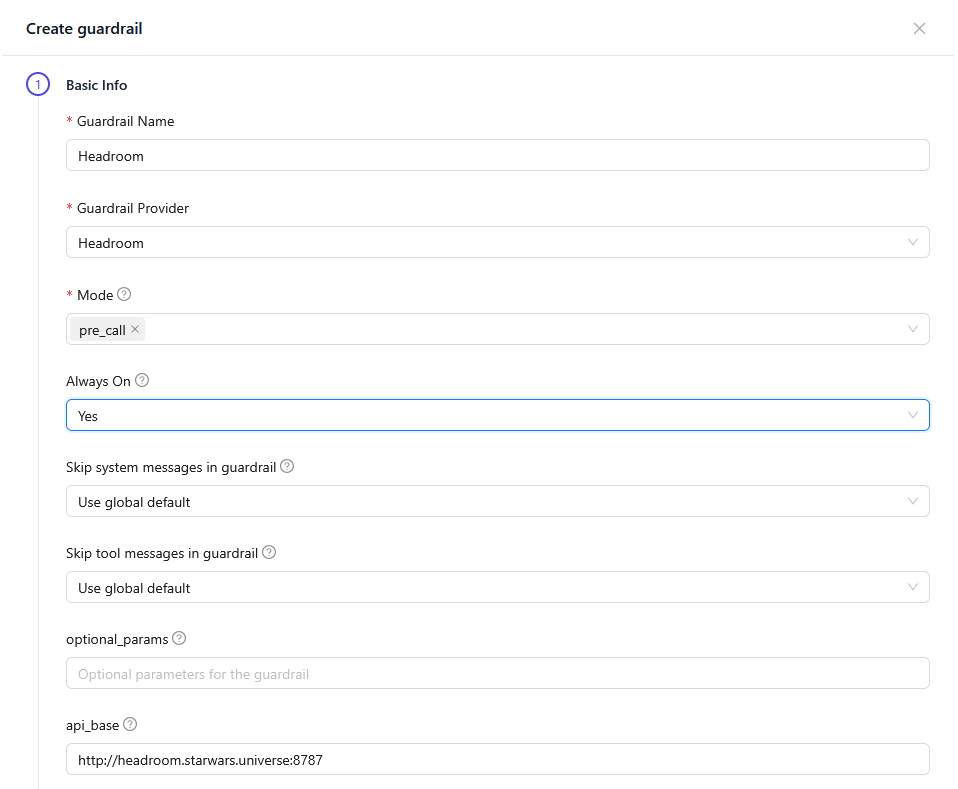
Once that was configured, I was able to see queries in the guardrail monitor in LiteLLM and could see the compression results in the LiteLLM UI.
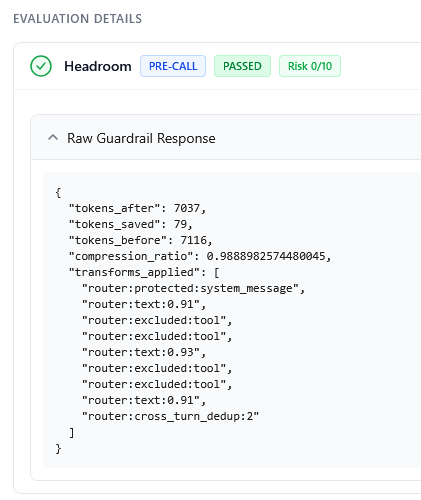
A compression ratio of 98.8% is not exactly game changing. But this was just a random query while I was testing OpenCode. I expect I will see better compression ratios in other queries. Either way, tokens saved are a good thing and this demonstrates that it is functioning.
Follow ups
- I'll take a deeper look at the headroom configuration and see if there are more aggressive compression settings that I may want to experiment with.
- I'd really like to visualize my compression ratio over time. Checking random queries in my guard rail logs is not going to help me get a feel for how effective this tool is.