
I wanted to add search providers to my LiteLLM config and it ended up being a bit more interesting than expected for a couple of reasons. First, the deployment went very smoothly and then did not work at all. After a lot of troubleshooting and a significant deviation from a standard deployment, I discovered the underlying reason and I wanted to share what that looked like and what caused it in case anyone else runs into a similar issue. Second, the architecture of how LiteLLM exposes search tools and how clients use them was slightly different than my original understanding so I wanted to share this as well.
Deploying SearXNG
I had a few options to configure as a search provider for LiteLLM and I ended up choosing SearXNG due to my preference for self-hosting and what appeared to be a well documented and supported integration with LiteLLM.
Because I run Proxmox in my homelab, I chose to deploy SearXNG in a LXC container (this would later be the root cause of the issues I experienced). It doesn't need a lot of resources. I assigned 2 vCPU cores and 2GB of RAM.
The documented install path is pretty straightforward (clone the repo...run the install script):
mkdir -p /usr/local/src && cd /usr/local/src
git clone https://github.com/searxng/searxng.git searxng
cd searxng
sudo -H ./utils/searxng.sh install all
After that completes, you need to install nginx and then run the installer again:
sudo -H apt-get install -y nginx
sudo -H ./utils/searxng.sh install nginx
I'm only using SearXNG internally so I did not bother to set up https right away but it should just be pretty straightforward nginx configuration from this point.
I had to edit the configuration file at /etc/searxng/settings.yml
search:
  formats:
    - html
    - json

server:
  limiter: false        # single internal consumer (LiteLLM/Perplexica), no public bot traffic
  secret_key: "<autogenerated during install>"
  base_url: http://<hostname or IP address>/searxng/
base_url must match the /searxng/ mount path, otherwise SearXNG generates internal links (static assets, result links) pointing at / instead of /searxng/.
limiter: false matters even with formats: json set: SearXNG's bot-detection limiter (on by default) blocks format=json requests via Sec-Fetch header checks regardless, returning a 403 that looks identical to a missing formats entry. Fine to disable on a private, internal-only instance; leave it enabled if this were ever public-facing.
And at this point, a quick service restart (sudo systemctl restart uwsgi) and SearXNG should be working. Mine was not. The site was up but every search returned an HTTP connection error across every search provider. This led to a long troubleshooting session and a series of validations and a late discovery of the underlying cause rendering all of that troubleshooting rather pointless.
Unnecessary Troubleshooting Detour
Here is the quick version of my troubleshooting and what I ruled out:
- IPv6 routing — My container had IPv6 addresses assigned but no real upstream route (curl -6 returned Network is unreachable on every address). Fixed via outgoing.source_ips: 0.0.0.0 in settings.yml, forcing IPv4. This resolved the IPv6 symptom specifically but not the underlying failure; the error changed from a routing error to a DNS resolution error (httpx.ConnectError: [Errno -2] Name or service not known), still on the same five engines, every time.
- DNS itself — ruled out thoroughly: dig bursts against the LAN resolver succeeded for all five domains under concurrent load, getent hosts succeeded as the searxng service user, and a standalone asyncio.get_event_loop().getaddrinfo() call succeeded outside of any running service.
- The Flask dev server (python webapp.py, no uWSGI in the loop) returned real search results immediately, first try. This isolated the problem to uWSGI specifically, not SearXNG's code, not the network, not DNS.
- Every individually testable uWSGI directive — lazy-apps, enable-threads, master, workers/threads (down to 1/1), single-interpreter — tested and eliminated one at a time. The final uwsgi.ini matched SearXNG's own documented reference configuration line for line.
- AppArmor inside the container — aa-status showed the in-container uwsgi-core profile as unconfined ("allows everything, exists only to give it a name"). This appeared to rule out AppArmor entirely.
At this point, I ended up swapping uWSGI for Granian. And then suddenly it started working. However, it did not make any sense to me that uWSGI was the actual root cause here.
The actual root cause was that I was running this inside an unprivileged Proxmox LXC container. The Proxmox AppArmor profile was silently blocking uWSGI socket syscalls by process name, with no error surfaced anywhere inside the container that would point at it. Switching to Granian bypassed this but was ultimately unnecessary.
Most SearXNG native-install guides and the project's own documentation are written against bare metal, VMs, or cloud instances, none of which have this extra host-level confinement layer. The install wasn't broken and nothing was missing from it; the hosting environment added a restriction the SearXNG project has no visibility into.
Connecting SearXNG to LiteLLM
This was pretty straightforward. I had to set an environment variable in config/litellm.env for my SearXNG URL base:
SEARXNG_API_BASE=http://<HOSTNAME OR IP>/searxng
Then I was able to add the rest from the Admin WebUI:
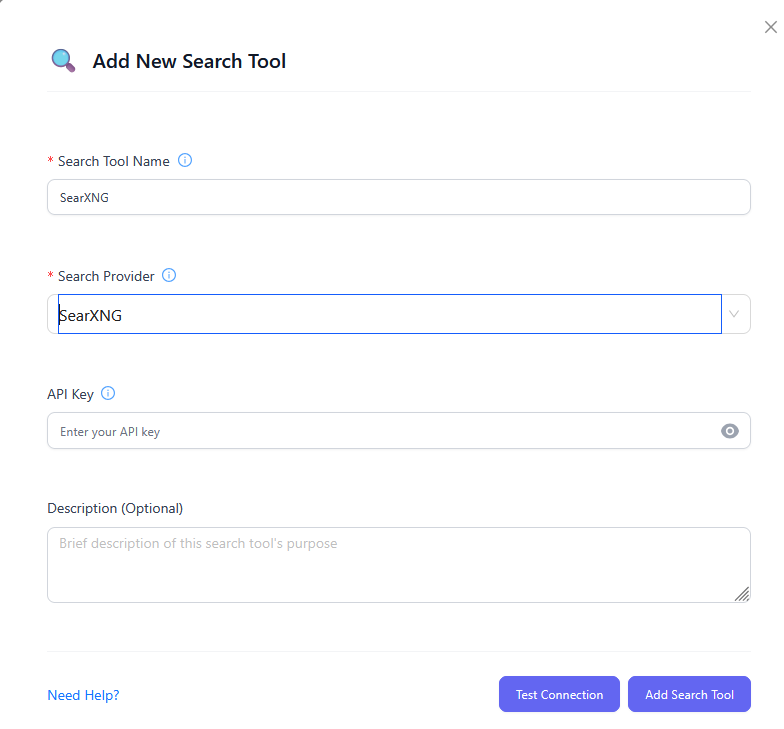
I added the API key (secret key) from the /etc/searxng/settings.yml file.
My Architectural Misunderstanding
At this point, I started trying to test with models I had exposed to OpenWebUI through LiteLLM. And it was not working. I had expected the search tool to be exposed to OpenWebUI (and it is), but that's not how OpenWebUI consumes a search tool. OpenWebUI expects to be wired to SearXNG directly. So I did that and it worked as expected. My new understanding is that chat tools will connect to SearXNG directly, but agentic coding harnesses like OpenCode or Codex will consume the search through LiteLLM as a tool. For now, I am happy to have SearXNG as a component in my lab and happy to see it functioning.