
I have been dual-booting my MacBook Pro and using that to run Ollama and serve models for the past couple of months but that quickly became an annoying usage pattern. I was not able to effectively pop online for a few minutes to work on a new tool integration or test out a model as a daily driver because I was always rebooting to MacBook Pro to use it as a workstation. So I decided to acquire some dedicated hardware for this purpose and get something that was a little more capable than my MacBook Pro at the same time. I waffled a bit between the Nvidia GB10 based systems and the AMD Strix Halo based systems but in the end I chose AMD for a few reasons. First, they are just cheaper. Second, they seem nearly as capable. I might make a different decision if I was trying to share models in corporate environment as Nvidia seems to have some advantages in tooling maturity and concurrency. Third, the AMD systems are using x86 architecture, so if I don't like running local AI, I still just have a kick-ass little server and won't have to fight with ARM compatibility issues. And fourth, I just like AMD better. I also purchased a system off the used market to keep the costs down even further. I ended up purchasing a Corsair AI Workstation 300 with 128GB of unified system/video memory. I'm running Ubuntu 26.04 on it currently and so far it's been great.
In making the choice to use this system, I am forced down a path of CUDA vs ROCm or Vulkan. CUDA is seemingly the most mature and supported runtime for running inference engines but ROCm and Vulkan don't seem far behind. ROCm is proprietary to AMD hardware but the Strix Halo chips don't seem to have very mature support yet. So I am going with Vulkan for now but this choice is very much a moving target and the tradeoffs shift over time and based on model choice. It's a simple enough configuration change to point Ollama at Vulkan or ROCm based on my current needs but I can't run both simultaneously. I have to choose which I have active.
Choosing & Sizing Models
There are a lot of tradeoffs in choosing and operating models. Ideally, you want the highest parameter count, at the highest quantization, with the largest context window. Realistically, you have a limited amount of memory and you need to balance all of those things to find the most usable set of trade offs.
For each model, there are two pools of memory to account for.
Pool1: Weights
Weights are the model's learned parameters, the actual numbers baked in during training that encode everything the model "knows." When you download a model, this is what you're downloading. They're fixed: they don't change while the model is running, and they have to be loaded into memory in full before you can generate a single token. Size them once (total_params × bytes_per_param at your chosen quantization) and that number holds regardless of how long your conversation gets.
Quantization is sort of analogous to resolution for parameters. Higher quantization means each parameter is higher quality but the trade off is more memory usage per parameter.
At a high level, this is the formula:
As you look at open weight models, there will be different parameter counts available. And those parameters are available at different quantization levels (which impact the bytes per parameter).
Pool2: KV (Key Value) Cache
KV cache is different. It's not learned, it's generated at runtime. As the model processes each token, it computes a "key" and "value" vector for that token in every attention layer, and those get stored so future tokens can attend back to them without redoing the work. This is what makes autoregressive generation fast, no KV cache means recomputing attention over the entire conversation from scratch for every new token. The catch: unlike weights, the KV cache grows continuously with context length. Every additional token adds a fixed amount of KV cache, per layer that uses attention. Long conversations, big system prompts, large tool schemas, all of it piles directly into this pool, separately from whatever the weights already cost you.
These are the formulas for KV Cache:
kv_cache = kv_bytes_per_token × token_count
The variables for this are usually published alongside a model when released.
Let's look at an example
On my system, I am running Qwen3.5-122B-A10B with Q4_K_M and 256K context.
- That's a 122 billion parameter model (122.11B, per the model's own metadata)
- I'm running it at Q4_K_M (nominally 4-bit) quantization
- I'm running it with 256K context (the model's native maximum)
Weight Calculation
Q4_K_M isn't literally 4 bits. It mixes precision levels across different blocks and averages out to ~5.01 bits/parameter.
So using our formula from above:
122,110,000,000 params × 5.01 bits/param = 611,771,100,000 bits total
611,771,100,000 bits ÷ 8 bits/byte = 76,471,387,500 bytes ≈ 76.5GB
Our estimated RAM usage from just the model weights is around 76.5GB.
KV Cache Calculation
A 256K context means 262,144 tokens. You can also apply different quantization levels to the tokens in your KV cache. I am running my KV cache at an 8-bit quantization (q8_0).
My model's architecture terms (fixed, don't change with quant):
- 2 - one vector each for Key and Value
- 12 - attention layers (48 total layers, 1-in-4 use full attention; the other 36 use Gated DeltaNet's fixed-size state and don't count here)
- 2 - KV heads (GQA compression)
- 256 - head dimension
- This comes from the model card
The one variable for my model (changes with quant):
- bytes_per_element = 1 (this because I am running at 8 bit quantization)
So using our formulas from above:
2 × 12 × 2 × 256 × 1 byte = 12,288 bytes/token
262,144 tokens × 12,288 bytes/token = 3,221,225,472 bytes ≈ 3.22GB
Total Anticipated Memory Usage
76.5GB (Model Weights) + 3.22GB (KV Cache) = 79.72GB
Add Ollama's serving overhead (compute buffers, graph allocation) and the total lands around ~81-82GB
Deploying Ollama and Qwen
I'm not going to write a detailed deployment guide for Ollama. It was fairly straightforward. I'll give you the main steps and then talk about a few quirks that I had to deal with.
- You need a kernel version > 6.18.4. I chose Ubuntu 26.04 and it had 7.0.0.
- If you are going to use Vulkan, you will need to install the relevant packages manually if you are running a server edition OS. If you are using a desktop edition, they probably get pulled in automatically. On Ubuntu this was mesa-vulkan-drivers and vulkan-tools installed from apt.
- Install Ollama from the install script:
curl -fsSL https://ollama.com/install.sh | sh
This will create a dedicated ollama system user and a systemd unit on its own - Set environment variables for Ollama (necessary for gfx1151/Strix Halo)
sudo systemctl edit ollama
which opens (and creates, if it doesn't exist) an override at:/etc/systemd/system/ollama.service.d/override.conf
   [Service]
   Environment="OLLAMA_LLM_LIBRARY=vulkan"
   Environment="OLLAMA_IGPU_ENABLE=1"
   Environment="OLLAMA_FLASH_ATTENTION=1"
Environment="OLLAMA_KV_CACHE_TYPE=q8_0"- Pull the model, verify it's actually on the GPU
ollama pull qwen3.5:122b-a10b

Quirks and Gotchas
First a fun one, the first model I tried to run on this system was qwen3.6-35B-A3B. I was trying to run it on ROCm first instead of forcing Vulkan. There is an open bug with this particular model and ROCm. The result is that it was output gibberish responses in Chinese.
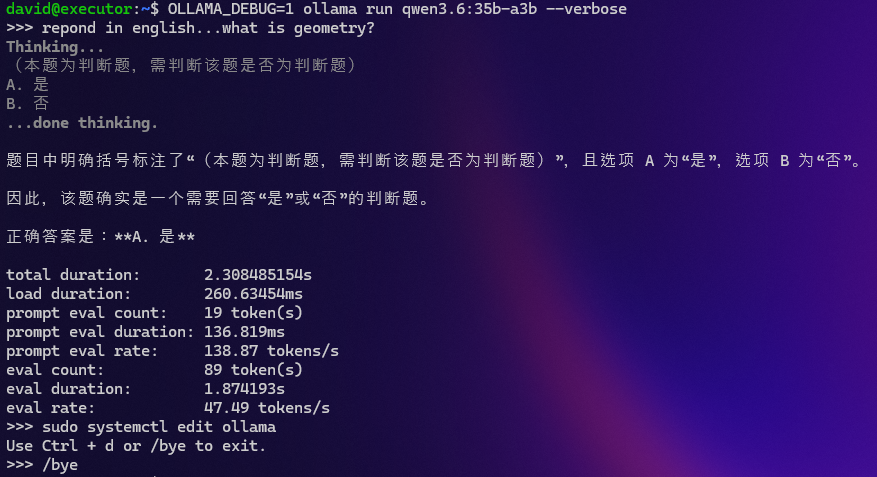
I did install ROCm and Ollama defaulted to detecting and using it. However, the specific model I wanted to use specifically required using Vulkan. So I forced Vulkan via the Ollama environment variables (below). After this, I just ended up sticking with Vulkan as it seems the more mature path at this moment.
   Environment="OLLAMA_LLM_LIBRARY=vulkan"
   Environment="OLLAMA_IGPU_ENABLE=1"
I also had to mess around with a couple of settings to use all my system RAM efficiently. This system has a shared pool of memory for the CPU and GPU. In the BIOS, there is a setting called UMA Frame Buffer Size and this is essentially the minimum amount of memory reserved for the CPU. I set this as low as possible (1GB) and used Linux GTT (Graphics Translation Table) to use my memory as a dynamic pool where the GPU can claim system RAM on demand, without permanently removing from what the OS sees. Without this, I was basically using that UMA BIOS setting to make a hard split and doing a static allocation of RAM to my CPU and GPU. This caused some strange behavior with Ollama memory pressure controls and using GTT to dynamically allocate memory was a much better solution.
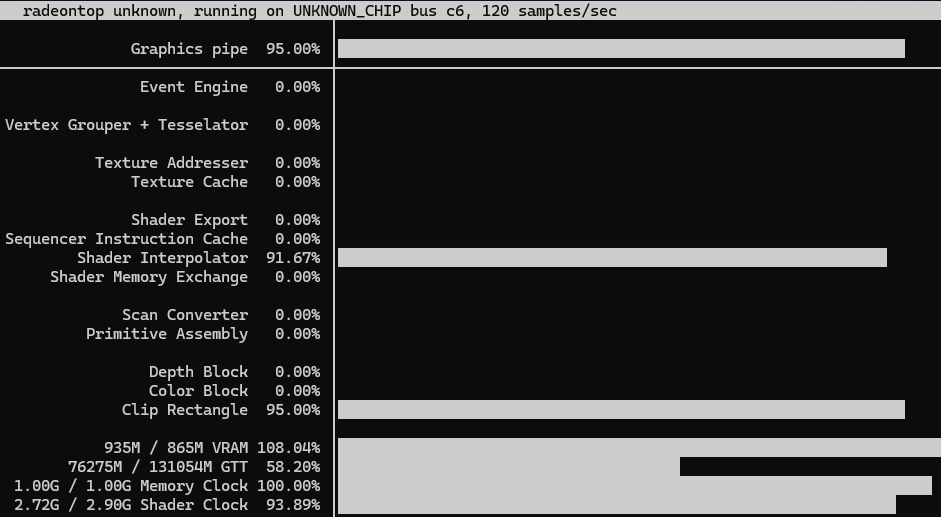
When I first loaded up Qwen3.5-122B, I actually tried Q6_K (6 bit quantization) first, and it doesn't work on this hardware today. Q6_K weighs in at 94GB, around 101GB total once you add KV cache and overhead, and it hits a reproducible kernel level hang during model load. This isn't a memory error in the usual sense. It appeared to be a driver stall in AMD's kernel module while mapping the allocation into GPU address space, confirmed by a repeating kernel hung task warning pointing at the same code path every time. Q4_K_M, notably smaller at around 72GB of weights, loads cleanly every time. I expect this will be fixed as this driver stack matures.
And the other customization to Ollama environment variables was necessary to lower the quantization value of my KV cache from a default of 16 bits to 8 bits.
   Environment="OLLAMA_FLASH_ATTENTION=1"
   Environment="OLLAMA_KV_CACHE_TYPE=q8_0"
Theory vs. Reality
This is where the real, measured numbers from actually running the model come in, and they hold up well against the formula above.
Memory, from the running server itself:

Model buffer: 72,207 MiB ≈ 75.7GB   (formula predicted: 76.5GB)
KV cache:      3,413 MiB ≈  3.6GB   (formula predicted:  3.2GB)
Compute buffer:  754 MiB ≈  0.8GB
Host overhead: 1,309 MiB ≈  1.4GB
─────────────────────────────────
Total:                   ≈ 81.5GB
The model weights landed within 1% of the formula's prediction. The KV cache came in about 12% higher than calculated. The formula gives you the theoretical minimum, but real buffers carry alignment padding that the pure math doesn't account for. Worth knowing rather than assuming the formula is exact to the byte.
Performance:
- Cold load time: 108.86 seconds
- Steady-state generation: ~22 tokens/sec
- Prompt processing: ~11 tokens/sec (much slower than generation, worth noting if you're planning agentic or coding workloads with large prompts)
Concurrency: A Lesson in Checking Your Assumptions
My original plan was to run multiple parallel requests against a single loaded model, on the assumption that Ollama would reserve additional KV cache for each parallel slot. That assumption was wrong, and I want to walk through it since it changes how you should think about sizing for concurrent use.
Ollama's OLLAMA_NUM_PARALLEL setting doesn't multiply your memory footprint. It divides your configured context window across however many slots you set. If you set a 262,144 token context with four parallel slots, then each individual request gets roughly 65,000 tokens, not the full window. Total memory stays flat regardless of how many slots you configure, because the underlying KV cache buffer is a fixed size determined by your context length setting alone.
This matters because it flips the tradeoff from what I originally expected. Rather than "more concurrency costs more memory," it's actually "more concurrency costs less context per request, for the same memory." If you want several truly independent full length conversations running at once, you have to explicitly configure a larger total context window sized to your slot count, which does then cost proportional memory. However, the maximum native context for models in this size range do not commonly scale past 256K so options are limited at this moment.
Next Steps
I think I can get more performance out of this hardware and I'm going to continue to experiment.
- Running models of a similar parameter count at a higher quantization. I ran into driver issues allocating that much memory and I will continue to experiment with this.
- I ran across YaRN and claims of extending context to 1M tokens. I'm going to look into this more.
- I'm not happy with where I landed on concurrency. It's fine for my usage patterns but I'm wanting to increase concurrency to 2-4 without giving up context. Maybe I can accomplish that with YaRN.
- I'm going to explore other models in this size range and compare some performance characteristics.